Wema Bank has embraced the convenience of mobile banking by offering the Wema bank USSD code service that allows customers to perform a variety of banking transactions such as transfers, airtime, check account balance, etc, directly from their mobile phones.
Among Nigeria’s top financial institutions is Wema Bank. One of the oldest banks in Nigeria, it was founded in 1945 and has a long history of offering financial services to private customers.
Customers may easily utilize the Wema Bank ussd code to complete any necessary transactions, thanks to the advancements in banking technology. You are not required to visit the bank physically.
This service eliminates the need for an internet connection or physical bank visits, making banking more accessible and efficient for Wema Bank customers.
Also read – Wema Bank Suspends 4 Fintech Partners, Permanently Removes 3 Others
Table of contents
- What is Wema Bank USSD Code?
- Features of Wema Bank USSD Code
- Comprehensive List of Wema Bank USSD Codes
- How to Activate Wema Bank USSD Code
- Wema Bank USSD Code Usage
- How to Block Wema Bank USSD Code
- How to Unblock Wema Bank USSD Code
- How to Upgrade My Wema Bank Account using USSD Code
- How to Pay Back Wema Bank Loan with USSD Code
- How to Borrow Money from Wema Bank with USSD Code
- How to Create a PIN for a Wema Bank Transfer
- How to Use Your PIN for Transfers
- What is the Wema Bank USSD Code to Check Account Balance?
- Paying Bills Using the Wema Bank USSD Code
- Advantages of Wema Bank USSD Code
- Security Measures for Wema Bank USSD Code
- Common Issues and Solutions
- FAQs
- Conclusion
- References
- Recommendations
What is Wema Bank USSD Code?
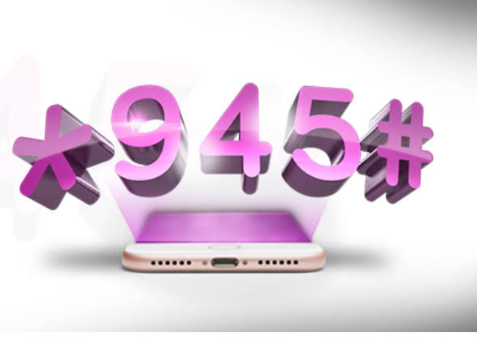
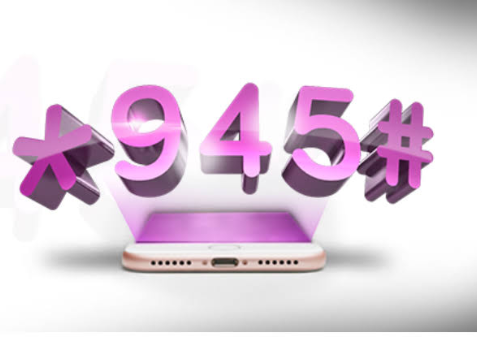
The Wema Bank USSD code, *945#, is a quick and easy way for customers to access a wide range of banking services using their mobile phones.
By dialing this code, customers can perform transactions such as checking their account balance, transferring money, recharging airtime, and more.
This service is available 24/7 and can be used on any mobile network, making it a versatile tool for managing your finances.
Also read – USSD Codes for Union Bank, Polaris, First Bank & Zenith
Features of Wema Bank USSD Code
- Convenience: Perform banking transactions anytime, anywhere, without needing an internet connection.
- Speed: Instant transaction processing.
- Security: Transactions are protected with a unique PIN.
- Accessibility: Available on all major mobile networks.
- Comprehensive: Offers various banking services, including transfers, airtime purchases, bill payments, and more.
Comprehensive List of Wema Bank USSD Codes
| Service | USSD Code |
|---|---|
| Check Account Balance | 945*0# |
| Airtime Recharge (Self) | 945*Amount# |
| Airtime Recharge (Others) | 945*PhoneNumber*Amount# |
| Transfer to Wema Bank Account | 945*AccountNumber*Amount# |
| Transfer to Other Banks | 945*AccountNumber*Amount# |
| Open an Account | 945*1# |
| Change PIN | 945*00# |
| Check BVN | 945*4# |
| Account Statement | 945*30# |
| Loan Request | 945*65# |
How to Activate Wema Bank USSD Code
- Dial *945#: From your registered mobile number.
- Follow Prompts: Select the option to register for USSD banking.
- Enter Account Details: Provide your Wema Bank account number.
- Create a PIN: Set up a 4-digit PIN for secure transactions.
- Complete Activation: Confirm your details to complete the activation process.
Wema Bank USSD Code Usage
To use the Wema Bank USSD code, dial *945# and follow the on-screen prompts to select the desired service.
Enter the necessary details and confirm the transaction using your PIN.
For example, to transfer money, select the transfer option, enter the recipient’s account number and the amount, then confirm with your PIN.
How to Block Wema Bank USSD Code
If you suspect unauthorized access to your account or lose your phone, you can block your USSD service by:
- Dialing 945911#: Follow the prompts to block your account.
- Contacting Customer Service: Call Wema Bank customer service at 08039003700 to request blocking of the USSD service.
- Visiting a Branch: Visit the nearest Wema Bank branch to request the service be blocked.
How to Unblock Wema Bank USSD Code
To unblock your USSD code, visit any Wema Bank branch or contact customer service.
You will need to verify your identity by providing necessary information such as your account number, full name, and other relevant details.
Also read – Ecobank USSD Code for Airtime, Transfer, & Mobile Banking
How to Upgrade My Wema Bank Account using USSD Code
Currently, upgrading your Wema Bank account tier via USSD code is not supported.
Please visit the nearest Wema Bank branch to upgrade your account.
How to Pay Back Wema Bank Loan with USSD Code
Wema Bank does not currently offer loan repayment through USSD code.
Please use the bank’s internet banking platform or visit a branch for loan repayment options.
How to Borrow Money from Wema Bank with USSD Code
To request a loan from Wema Bank using the USSD code:
- Dial 945*65#: From your registered mobile number.
- Follow Prompts: Select the loan type and enter the required details.
- Submit Request: Confirm the loan request by entering your PIN.
How to Create a PIN for a Wema Bank Transfer
To create a PIN for a Wema Bank transfer, follow these steps:
Creating a PIN is an essential step to secure your Wema Bank USSD transactions.
The process is straightforward and can be completed in a few minutes. Here’s how to do it:
- Dial the USSD Code:
- From your mobile phone, dial *945# using the number registered with your Wema Bank account.
2. Select the PIN Creation Option:
- When the USSD menu appears, select the option for PIN setup. This is often labeled as “Create PIN” or “Register PIN.”
3. Enter Your Wema Bank Account Number:
- You will be prompted to enter your Wema Bank account number. Input your account number and proceed.
4. Enter a 4-digit PIN:
- Choose a 4-digit PIN that you can easily remember but is hard for others to guess. This PIN will be used to authorize your transactions.
5. Confirm Your PIN:
- Re-enter the 4-digit PIN to confirm it. Ensure that you input the same PIN to avoid any errors.
6. Complete the Setup:
- Follow any additional prompts to complete the setup process. Once done, you will receive a confirmation message indicating your PIN has been created successfully.
How to Use Your PIN for Transfers
Once your PIN is set up, you can use it to authorize various transactions, including:
- Transferring to a Wema Bank Account:
- Dial *945*AccountNumber*Amount#.
- Enter your PIN to confirm the transfer.
2. Transferring to Other Banks:
- Dial *945*2*AccountNumber*Amount#.
- Enter your PIN to complete the transfer.
Creating a PIN for Wema Bank transfers is a crucial step to ensure the security of your transactions.
Following these simple steps, you can quickly set up your PIN and use the USSD code for various banking services, providing convenience and peace of mind.
Also read – Latest way to Buy Airtel Airtime on MPesa 2024
What is the Wema Bank USSD Code to Check Account Balance?
To check your Wema Bank account balance using the USSD code, follow these steps:
- Dial the USSD Code:
- From your mobile phone, dial 945*0#.
2. Follow the Prompts:
- If prompted, enter your USSD banking PIN to confirm the request.
3. Receive Account Balance:
- Your account balance will be displayed on your screen.
By dialing 945*0#, you can quickly and easily check your Wema Bank account balance at any time.
Ensure you use the phone number registered with your Wema Bank account to access this service.
Paying Bills Using the Wema Bank USSD Code
Paying bills using the Wema Bank USSD code is a convenient way to manage your payments directly from your mobile phone without an internet connection.
Here’s how you can do it:
- Dial the USSD Code:
- From your registered mobile phone, dial *945#.
2. Select the Bill Payment Option:
- From the menu, select the option for “Bill Payment” or “Pay Bills.” The exact wording may vary slightly.
3. Choose the Type of Bill:
- You will be presented with a list of bills you can pay, such as electricity, water, cable TV, etc. Select the type of bill you want to pay.
4. Enter the Required Details:
- Depending on the bill type, you may need to enter additional details such as:
- Customer or meter number (for utility bills)
- Amount to be paid
- Service provider (e.g., PHCN, DSTV, etc.)
5. Confirm the Payment:
- Review the details you have entered to ensure they are correct.
6. Enter Your PIN:
- Enter your USSD banking PIN to authorize the payment.
7. Receive Confirmation:
- Once the payment is processed, you will receive a confirmation message on your screen indicating the transaction’s success.
Advantages of Wema Bank USSD Code
- Ease of Use: Simple codes and prompts make transactions straightforward.
- Time-Saving: Perform transactions quickly without needing to visit a bank.
- Cost-Effective: Avoid transaction fees often associated with ATM or bank visits.
- Availability: Accessible 24/7, providing banking services round-the-clock.
Also read – Updated List of All Ecobank USSD Codes for Banking Transactions
Security Measures for Wema Bank USSD Code
- PIN Protection: Always keep your PIN confidential.
- Mobile Number Registration: USSD services are tied to your registered mobile number.
- Immediate Blocking: Block the service immediately if your phone is lost or stolen.
Common Issues and Solutions
- Transaction Failures: Ensure you have network coverage and sufficient funds.
- Incorrect PIN: Reset your PIN by contacting customer service if forgotten.
- Unregistered Number: Ensure your mobile number is registered with Wema Bank.
FAQs
The USSD code for wema bank is *945#. It allows you to access a wide range of banking services from your mobile phone without an internet connection.
Dial *945# from your registered mobile number, follow the prompts to enter your account details, and create a 4-digit PIN to complete the registration.
Dial *945*0# from your registered mobile number and enter your USSD banking PIN to view your account balance.
Dial *945*AccountNumber*Amount# for transfers within Wema Bank or *945*2*AccountNumber*Amount# for transfers to other banks. Confirm the transaction with your PIN.
Dial *945*Amount# from your registered mobile number to buy airtime for yourself.
Yes, dial *945*PhoneNumber*Amount# to buy airtime for another number. Confirm the transaction with your PIN.
Dial *945# and select the “Pay Bills” option. Choose the type of bill, enter the required details, confirm the amount, and authorize the payment with your PIN.
Contact Wema Bank customer service at 08039003700 or visit a Wema Bank branch to reset your PIN.
Dial *945*911# from any phone to block your USSD service or immediately contact Wema Bank customer service.
Conclusion
Wema Bank USSD code service, accessible via *945#, provides a seamless, secure, and efficient way to manage your banking needs.
With a few simple steps, you can perform a variety of transactions directly from your mobile phone, making banking more convenient than ever before.
Whether it’s transferring money, checking your balance, or recharging airtime, Wema Bank USSD service is designed to offer you maximum flexibility and control over your finances.
References
Recommendations
- Wema Bank Suspends 4 Fintech Partners, Permanently Removes 3 Others
- USSD Codes for Union Bank, Polaris, First Bank & Zenith
- Ecobank USSD Code for Airtime, Transfer, & Mobile Banking
- Latest way to Buy Airtel Airtime on MPesa
- Updated List of All Ecobank USSD Codes for Banking Transactions
Interact with us via our social media platforms:
Facebook: Silicon Africa.
Instagram: Siliconafricatech.
Twitter: @siliconafrite.